
How to Find Your Vocal Range
Discover your lowest and highest comfortable singing notes using gentle pitch matching, sirens, and a piano app to identify your exact vocal classification.
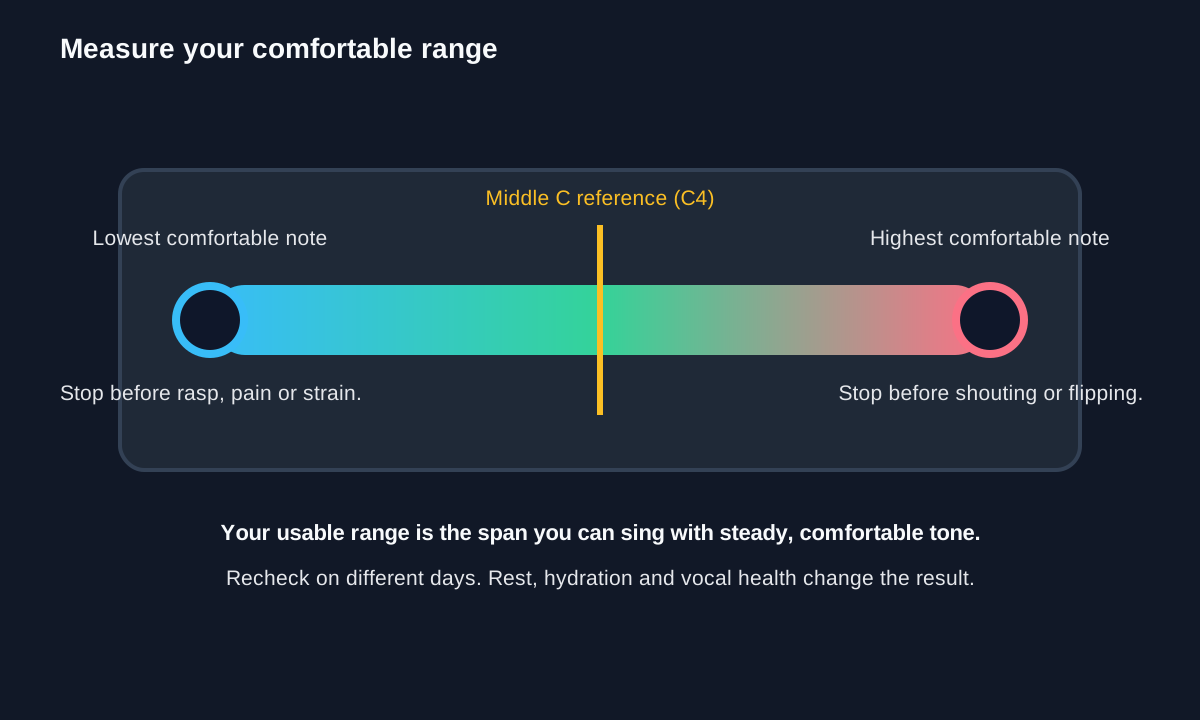
Warm up gently, find Middle C with a piano or tuner, then sing down and up to your lowest and highest comfortable notes. Do not push into pain or strain.
Watch: How to Find Your Vocal Range
Warm up first, find your lowest and highest comfortable notes, then name the range. · 3:39 minute walkthrough. The full written steps are below.
Log your comfortable range, not your absolute limit
Use the pitch map to understand the test, then record the lowest and highest notes you can sing with stable, comfortable tone.
Range logger
This is a practice log, not a medical or vocal-professional assessment.
Keep the test useful
- Warm up with gentle sirens or humming.
- Use a tuner or piano app for reference pitches.
- Stop before forcing a rasp or shout.
- Record the date and repeat on another day.
- Judge tone quality, not just the highest squeak.
Build range safely
- Warm Up Your Voice Before SingingPrepare before testing or performing.
- Expand Your Vocal Range SafelyTrain gradually without forcing.
- Sing on PitchImprove accuracy through your range.
- Find Middle C and Learn the Piano KeysStrengthen the reference pitches.
- Care for Your Singing VoiceProtect your voice between sessions.
Visual step map
See the full sequence before you start, then check off each step as you go.
0 of 6 steps checked
Materials and cost planner
Select the items you plan to buy, adjust any estimated price, and calculate the selected total.
Editable rough U.S. retail estimates. Estimated all listed: $89.00. Prices are planning estimates, not quotes — tax, store, brand, size and quantity will change them.
Time and finish planner
Estimate active working time from the number of steps in this guide.
Practice time calculator
Turn measures, beats and tempo into a realistic amount of practice time for one pass or a repeated loop.
Stop if you feel pain or tension. Slow repetitions with clean technique are usually more valuable than fast repetitions.
- Read the tools, materials, safety notes, and steps below for free.
- Tap See 20-second demo if you want to understand it first.
- Tap Start Camera Coach when you want hands-free help, or Voice-only if you do not want to use the camera.
- Allow camera and microphone. Point your phone at the work; the coach watches your progress and tells you the next step.
🧰 Required Tools & Equipment
- ✓ Virtual piano app or physical keyboard
- ✓ Chromatic tuner or pitch detector app
- ✓ Smartphone on a stable stand
- ✓ Full-length or tabletop mirror
📦 Materials & Supplies
- ✓ Glass of room-temperature water
- ✓ Notebook and pen
⚠️ Safety Checkpoints & Warnings
- • Stop immediately if you feel scratching, tickling, hoarseness, or throat pain.
- • Maintain a neutral spine and relaxed jaw; never tilt your chin sharply up or down to force pitches.
- • Breathe from the diaphragm without lifting shoulders or tightening the neck muscles.
📋 Step-by-Step Guide (6 Steps)
Establish Posture and Relax the Body
Position your camera at eye level so your upper torso and head are fully visible. Stand with feet shoulder-width apart, roll your shoulders back and down, and keep your chin level with the floor. Take three slow, deep diaphragmatic breaths through your nose, letting your belly expand naturally.
- • Shoulders stay dropped and relaxed during inhalation
- • Chin remains parallel to the floor without forward-head jutting
- • Raising shoulders toward ears on inhale
- • Locking knees or tensing the jaw
Wake Up the Vocal Cords with Gentle Sirens
Sip room-temperature water, then create a gentle lip trill (motorboat sound) or gentle hum on 'Mmm'. Glide smoothly from a comfortable low speaking pitch to a mid-high pitch and back down three to four times. Keep the sound soft and effortless to warm up the vocal folds without pushing volume.
- • Continuous lip vibration without sudden stops
- • Neck muscles remain flat and free of bulging veins
- • Pushing excessive air pressure to force the trill
- • Starting with loud or aggressive pitches
Establish Middle C (C4) Reference Point
Open your piano app and locate Middle C (marked as C4). Play the note, listen carefully for two seconds, and sing a sustained 'Ah' or 'Oo' matching the pitch into your tuner app. Confirm that your tuner reads C4 (or C3 for lower male voices) steadily in the green zone.
- • Tuner dial settles directly on the target note name and octave
- • Mouth opening forms a relaxed oval shape
- • Singing sharp or flat due to attacking the note too quickly
- • Tensing the tongue back into the throat
Descend Step-by-Step to Find Your Lowest Note
Starting from your anchor pitch (C4 or C3), play each descending half-step (B, Bb, A, etc.) on the keyboard and sing along on 'Ah'. Stop as soon as the note loses tonal resonance, flips into a raspy vocal fry, or requires dropping your chin to your chest. Write down the last solid, audible pitch you sang cleanly.
- • Larynx remains in a stable, neutral position
- • Note registers with a sustained tone rather than a clicking rattle
- • Counting forced vocal fry as a usable singing note
- • Tucking the chin into the chest to squeeze out low frequencies
Ascend Step-by-Step to Find Your Highest Supported Note
Return to your anchor pitch and play ascending half-steps (C#, D, D#, etc.) on an open 'Ah' or 'Ee' vowel. Sing along with each key, maintaining an open throat and steady breath support from your lower abdomen. Mark the highest note you can produce with clear, connected tone before straining or breaking.
- • Jaw drops vertically without protruding outward
- • Chest remains open without hiking upward on high pitches
- • Tilting the chin upward toward the ceiling to reach high notes
- • Screaming or forcing volume to sustain pitch
Log and Classify Your Vocal Range
Review your lowest and highest recorded notes written in your notebook (for example, G3 to E5). Calculate the interval distance and compare your low-high span against standard vocal classifications: Bass (E2–E4), Baritone (A2–A4), Tenor (C3–C5), Contralto (F3–F5), Mezzo-Soprano (A3–A5), or Soprano (C4–C6). Note your closest category and date the entry to track your vocal development over time.
- • Completed log entry displaying lowest note, highest note, and octave count
- • Clear voice classification label matched to standard ranges
- • Forcing an identity into an extreme category instead of honoring your natural comfort zone
- • Assuming vocal range is permanently fixed rather than expandable with training
Don’t have everything?
- No Piano keyboard app? Free online pitch generator or virtual piano website
- No Vocal tuner app? Chromatic guitar tuner app or browser-based pitch detector
Frequently asked questions
Do I need a piano to find my vocal range?
No. A piano app or tuner can provide reference pitches, but the key is to find the notes you can sing comfortably.
Should I force low or high notes?
No. Stop when the note becomes strained, croaky, or uncomfortable. Your range is the comfortable range, not the absolute limit.
How long does it take?
A basic range check takes about 10–15 minutes, including a gentle warm-up. Recheck on different days because range varies with rest and health.